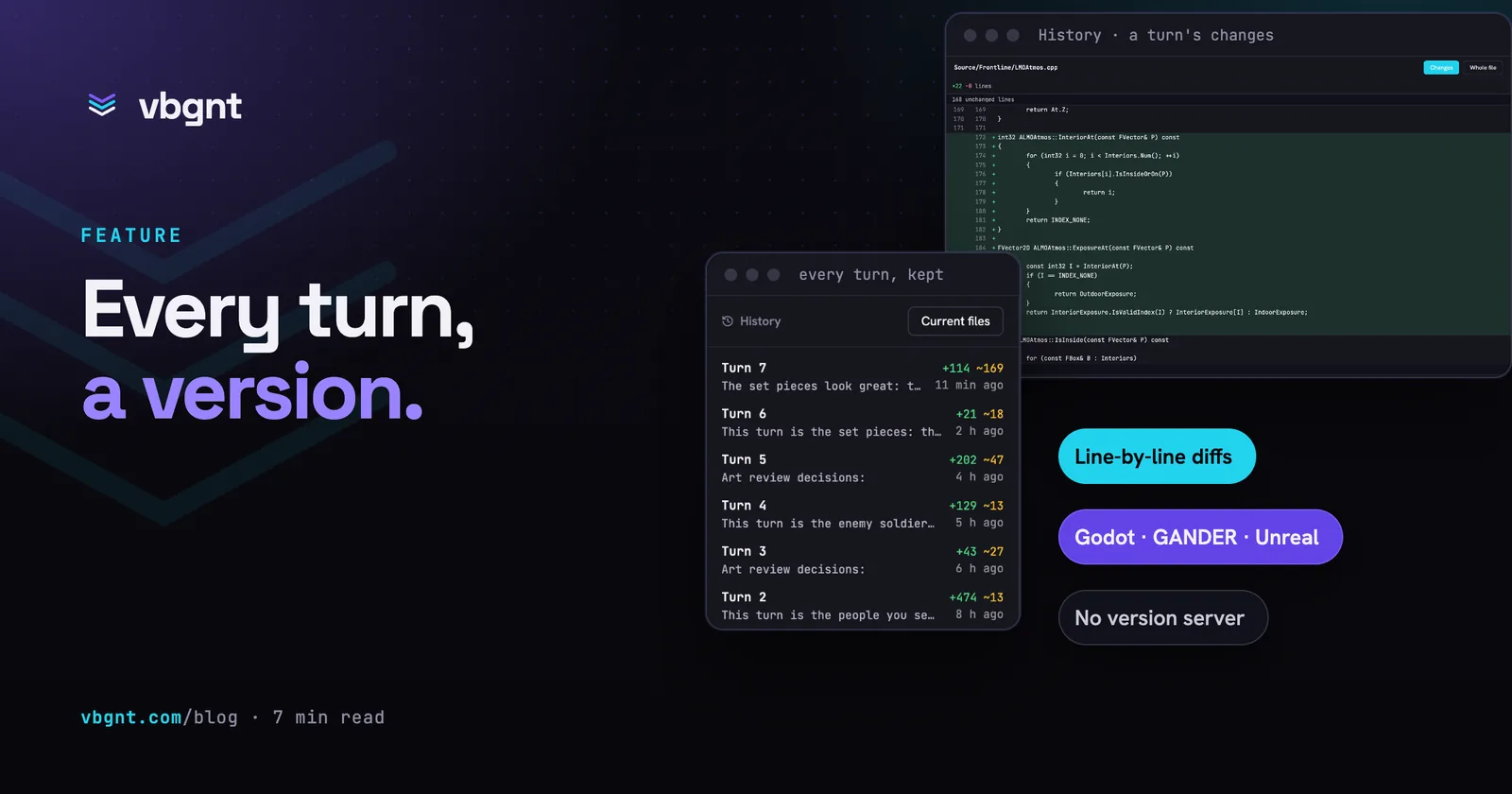
Every turn the agent takes now becomes a version you can open. The Files pane has a History button: a list of every turn with what it added, changed and deleted, the file tree as it stood after that turn, and a line-by-line diff of any code file between one turn and the one before. Underneath it is Lore, Epic's new open-source version control system, which was built for projects full of large binary assets.
It also replaced how saved builds are kept. Godot and GANDER games no longer store a full copy of the project for every build, and Unreal games, which kept nothing, now have saved versions you can browse and restore from like any other game.
This post covers why we needed it, how we run it without a server, what we measured, and what the History view does and doesn't do yet.
Why did games need version history?
Because the agent changes a lot in one turn, and sometimes you liked it better before.
We had a version of this already. Every Godot build was saved as a copy: the whole project, plus the playable web build, with the newest 10 kept. It worked, but copies are expensive. One of our 3D shooters has 209 MB of sources and was keeping 2 GB of saved versions. Another, 176 MB of sources, kept 1.9 GB. Ten copies of mostly unchanged files.
Unreal games had nothing at all. An Unreal project lives on a cloud workstation and syncs back to storage after each turn, overwriting the last one. When a turn rebuilt a game's weapon handling and the owner preferred the old one, there was no earlier version to go back to. We had taken a snapshot by hand an hour before, which is the only reason that story ends well.
What is Lore?
Lore is a version control system Epic released as open source in June 2026, under the MIT licence. Inside Epic it has been the built-in version control for Unreal Editor for Fortnite. It is designed for exactly the projects Git struggles with: code mixed with gigabytes of textures, meshes and audio.
It stores files as content-addressed chunks. When a turn changes 4 KB inside a 21 MB music file, Lore stores the changed chunk, not another 21 MB. Unchanged files cost nothing. Everything is compressed.
Lore is young. The version we use is 0.12, and the project says plainly that formats can still change before 1.0. We pin the release, check its checksum, and treat any upgrade as a deliberate step.
How do we run it without a server?
Lore is a client and a server. The obvious setup is a server running all day that every workstation talks to. We didn't want one: it costs money while idle, and anything reachable over the internet needs real sign-in.
So the server only exists for a few seconds per turn. When a turn ends, the machine that ran it (the Unreal workstation, or the agent's own machine for Godot and GANDER games) starts a Lore server that listens only to itself, commits the project as one version, and stops. The history itself lives in storage next to the game. The next turn pulls it down, adds one version and puts it back.
The only ongoing cost is storage. Deleting a game deletes its history with it.
Two things went wrong on the way, and both shaped the design:
- A server stopped abruptly can forget the repository. On Windows our runner has no polite way to stop the server, only a hard stop. With Lore's flush delay set to zero, a hard stop left every file on disk but a restarted server couldn't find the repository. With a one-second flush, and a wait until the files stop changing, it survives. We tested both.
- A fresh machine has the files but no history folder. The obvious fix, a normal clone into the project, refuses any file that differs from the last saved version, which is exactly the case after a turn whose save failed. A clone that downloads no files, moved into place, adopts the project as it is and continues the history.
What did we measure?
We tested on a real Unreal project: 1.09 GB, 1,250 files, most of it binary assets.
- First version: 15 seconds. The history took 752 MB, 69% of the project size. Game assets are already compressed, so the first version doesn't shrink much.
- A typical turn (one line of code and a few kilobytes inside a large asset): 0.1 seconds, and the history barely grew.
- A turn that changed nothing: 0.04 seconds, and no version is saved.
- Restoring one file to an earlier version: 0.06 seconds. The whole project: 0.49 seconds. Both byte-for-byte identical to the originals.
- A fresh copy of an old version from the history alone: 10.5 seconds, all 1,250 files identical.
The first real Unreal turn on a cloud workstation saved 1,246 files into a 635 MB history. The first Godot and GANDER builds saved histories the size of their sources, 6.5 MB and 37 MB. From there each turn adds only what changed.
What happened to saved builds?
They stayed, and got cheaper. The version picker in the Files pane still lists your recent builds, and you can still open any file from one, restore it over the current one, or attach it to your next message for the agent to look at. What changed is where the files come from.
Each build used to copy the whole project. Now a build records its Lore version, and opening a file from it reads that version. Alongside Lore's own history we keep one copy of each distinct file, named by its contents, so the studio can open any file from any version directly. A file that didn't change between builds is stored once, however many builds include it.
The playable copy of each build is unchanged: the last 10 builds can still be played from the picker. Builds saved before the switch keep their full copies until they age out of the last 10. Nothing was converted, so nothing could be lost in a conversion.
Unreal games get the same picker for the first time. Their versions are their turns, and any file from any turn can be opened or restored.
What does the History view show?
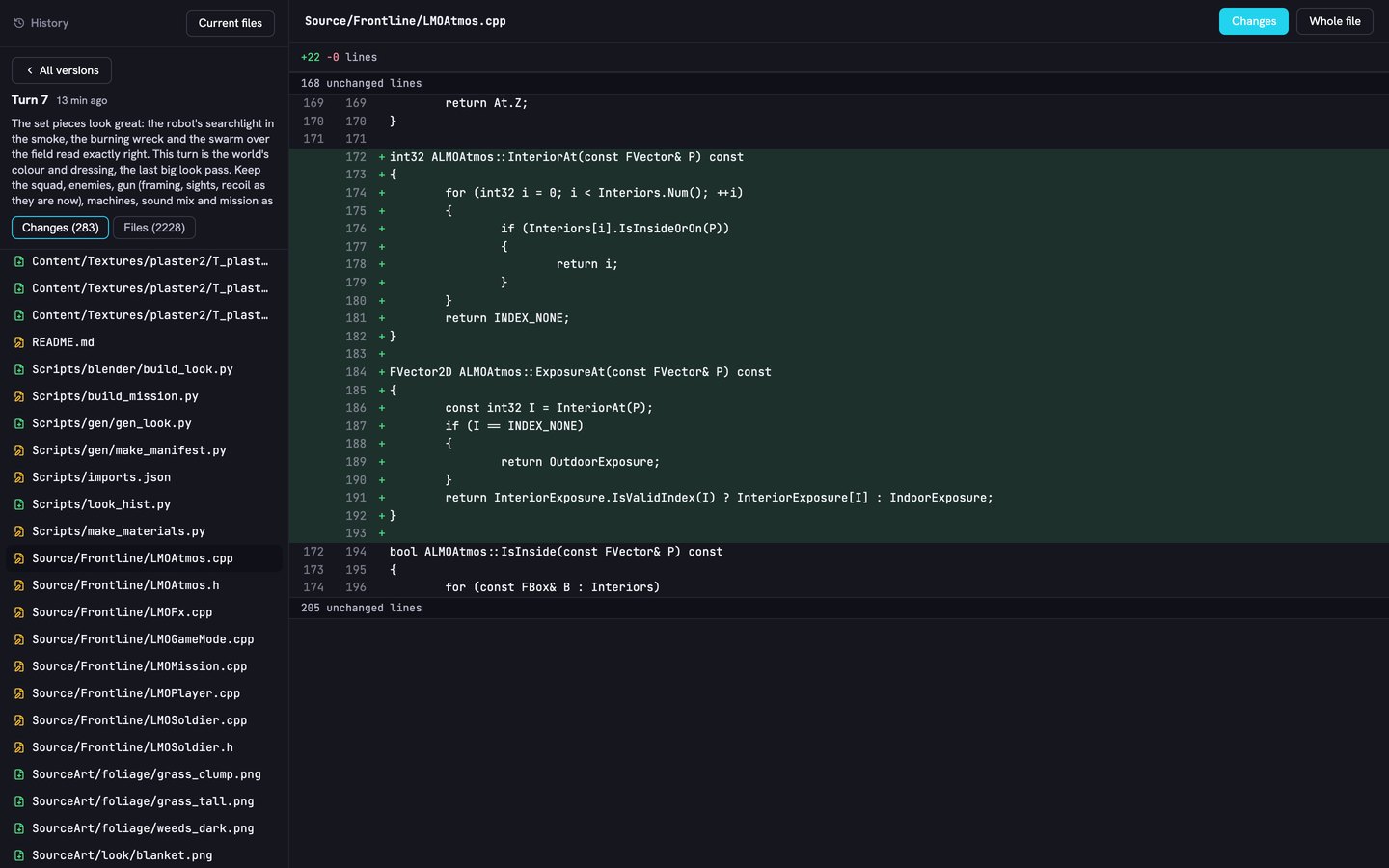
Open the Files pane and press History. You get a list of versions, newest first: the prompt that made each one, when, and how many files it added, changed and deleted.
Pick a version and there are two tabs:
- Changes lists every file that version touched. Open a changed code or config file and you see a line diff against the version before, with unchanged stretches folded away. Switch to Whole file to read it in full.
- Files is the project as it stood after that turn, folder by folder, with each file's size and the version that last changed it.
Code, configuration and other text files up to 256 KB can be read and compared. Binary assets (meshes, textures, audio, Unreal's own asset files) show their size and which turn changed them, but not their contents.
What doesn't it do yet?
- History is for reading, the picker is for restoring. Single files are restored from the Files pane's version picker, for every engine. Rolling a whole project back to an earlier turn in one step is the next piece.
- Versions saved before 31 October are listed but greyed out: they were recorded before the file tree and diffs were.
- Two copies of the history, on purpose. Lore keeps the history in its own format, and the studio keeps one copy of each distinct file so it can open them without running Lore. That is more storage than Lore alone, and still far less than ten full copies of a project.
If you have a game in the studio, it already has a history: every turn since this went live is in it.
Frequently asked questions
What is Lore?
Lore is a version control system Epic Games released as open source in June 2026 under the MIT licence. It was the built-in version control for Unreal Editor for Fortnite, and it is designed for projects that mix code with large binary assets, storing files as compressed, content-addressed chunks so an unchanged file costs nothing and a small change stores only the changed chunk.
Which games get version history?
Every game in the studio: Unreal, Godot and GANDER. Each turn the agent takes is saved as a version once it finishes. Godot and GANDER games also keep the last 10 builds playable, as before.
What happened to saved builds?
They are still in the Files pane's version picker, and you can still open, restore or reference any file from one. A build no longer copies the whole project: it records its Lore version, and its files are read from the history, where a file that didn't change is stored once. Builds saved before the switch keep their full copies until they age out of the last 10.
Can I see what the agent changed in a turn?
Yes. Open the Files pane and press History, then pick a version. The Changes tab lists every file it touched, and opening a code or config file shows a line diff against the version before. Text files up to 256 KB can be read and compared; binary assets show their size and which turn changed them.
Can I restore an earlier version?
Yes, file by file, for every engine: pick the version in the Files pane, open the file and restore it over the current one. Unreal games have this for the first time. Rolling a whole project back to an earlier turn in one step is the next piece.
Does version history cost extra or slow turns down?
No extra charge. Saving a version takes seconds at the end of a turn: a typical turn on a 1.09 GB Unreal project took 0.1 seconds, and the first version of a project about 15. Only the changed parts of files are stored.
What happens to the history when I delete a game?
It is deleted with the game. The history is stored next to the game's own files, not in a shared server.