Until 18 October the agent could tell you how a Pro game looks, but not how fast it runs. Now it can. A performance check runs your game's desktop build on a cloud GPU in real time, times every frame, and tells the agent where each one went. The agent fixes the biggest cost and measures again.
We gave two Pro games one performance turn each and filmed it. One had a ten-second freeze nobody had noticed. The other was already smooth, and the check proved it, then found something wasteful anyway. This is what the check measures, how to ask for one, and what it found.
Why couldn't the agent measure frame rate before?
Because its test runs weren't built for speed. When the agent checks a game, it plays it on a fixed clock: every frame moves the game forward exactly one thirtieth of a second, however long that frame really took to draw. That's what you want for screenshots and video, since every run of a seeded demo lands on the same frame. It also means a frame that took ten seconds and a frame that took ten milliseconds look identical in the output.
So for a long time the honest answer to "does it run well?" was "it looks right". The agent could see a broken shader. It couldn't see a stutter.
What does a performance check measure?
A performance check drops the fixed clock. It runs the desktop build on a cloud GPU at 1920x1080, in real time, with no frame cap and no vsync, and times every frame. The agent labels the stretches it cares about (a fight, the widest view, each graphics quality preset) and every stretch gets its own numbers:
- Average frame rate, and the 1% low: the frame rate across the slowest one frame in a hundred.
- Frame times at the median and the 95th and 99th percentiles, and the worst frames with when they happened.
- Where each frame's time went: scripts, physics, the renderer's own CPU work and the graphics card.
- Draw calls, triangles, memory and video memory alongside.
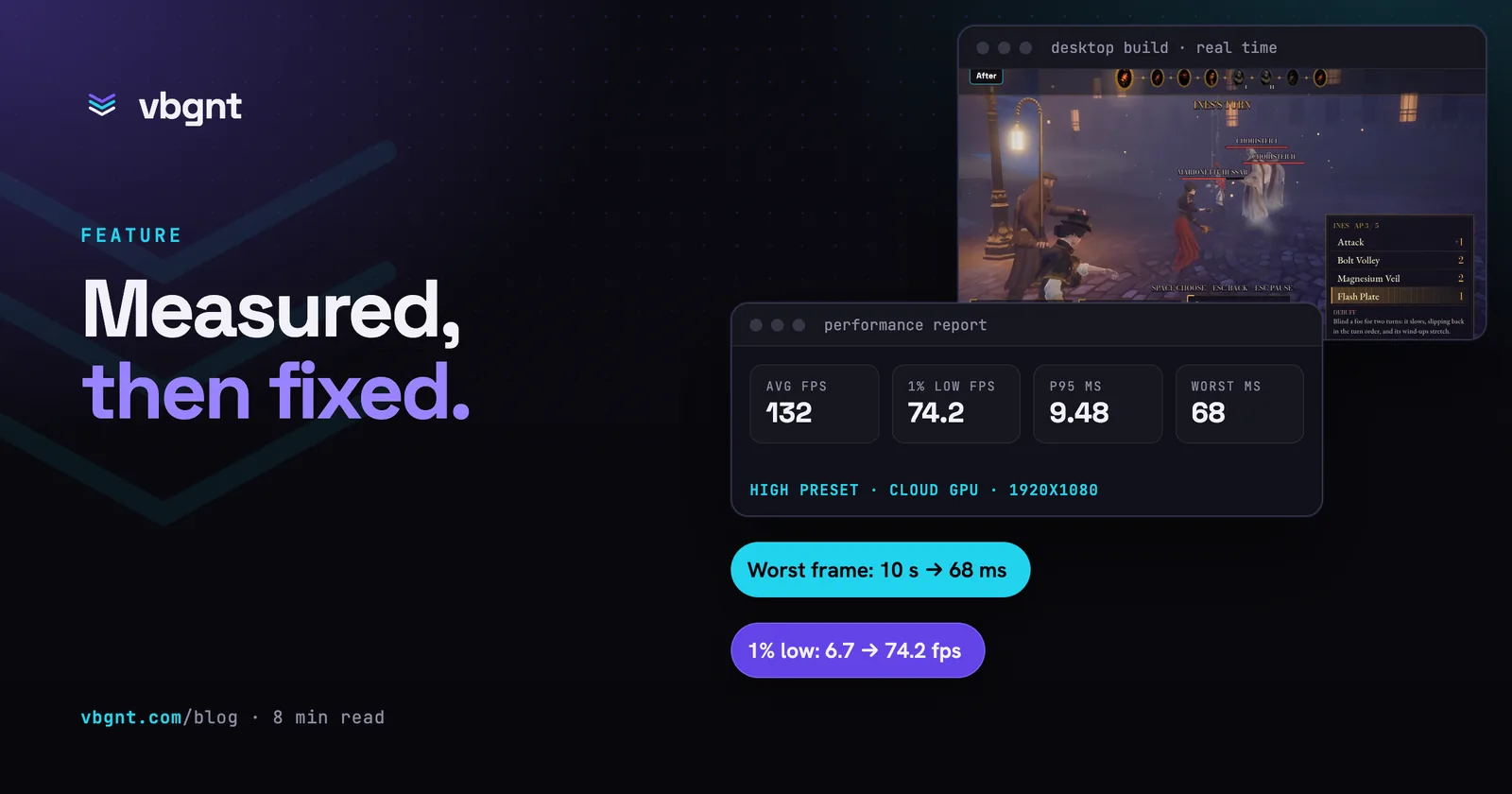
Here's a real report, the RPG's opening fight on its High preset, after the fixes below:
| Measure | Value |
|---|---|
| Average frame rate | 132.1 fps |
| 1% low | 74.2 fps |
| Frame time, median / p95 / p99 | 7.39 / 9.48 / 10.78 ms |
| Worst frames | 68.1, 30.2, 26.6 ms |
| Per frame: scripts / physics / render CPU | 0.31 / 0.02 / 0.66 ms |
| Per frame: graphics card | 7.41 ms |
The split is the useful part. A slow frame that is mostly scripts needs code moved out of the per-frame loop. A slow frame that is mostly graphics card needs cheaper shadows, fog or lighting, usually in the lower presets so High keeps its look. Without the split the agent would be guessing which kind of slow it was.
What is the 1% low, and why does it matter more than the average?
Because the average hides stutter. Before its fixes, the same RPG fight averaged 108 frames a second on High. That sounds fine. Its 1% low was 6.7 frames a second, because a handful of frames took over a second each, and one took ten. You don't feel an average. You feel the freeze.
The agent reports both, and treats a 1% low far below the average as the first thing to explain. It also reports the first couple of seconds of every stretch on their own, because that's where shaders compile and where most stutter lives.
How do you ask for a performance turn?
Ask for numbers, name the parts of the game you care about, and say what must not change. This is the prompt we sent for the RPG, word for word. The shooter's was the same with its own fights named.
New task: performance, combat only. I want real numbers, not a feel.
1. Measure first. Profile combat on the desktop build with the studio's performance checks on the cloud GPU, at 1920x1080: the attract fight (what --demo plays) and the boss fight (what --demo=boss plays), at least 30 seconds of real combat each, with every graphics quality preset as its own section. Include the first time each combat effect appears (the brass timing ring and its flame, a parry, a PERFECT flare, the cameo lockets sliding), because that is where stutter would show.
Save the report as perf/before.md: a short table per fight and preset with average fps, 1% low, p95 frame time and the worst frame, and where the time goes (scripts, physics, render CPU, GPU, draw calls). Save each raw report as perf/before-fight.json and perf/before-boss.json.2. Then make combat run better where the numbers say it matters. Fix the biggest cost first. Smooth out any hitch the first time an effect appears (warm the shaders and particles up behind the loading screen). Make the Low preset comfortable for a mid-range laptop.
Do not change how combat looks on the High preset. Keep every timing window, the --demo modes and the web preview working exactly as they are.3. Measure again the same way. Save perf/after.md with the same tables, before and after side by side, plus perf/after-fight.json and perf/after-boss.json. Keep perf/ out of the exports.
The GPU machines are not all the same card, and the report names the one it ran on: compare before and after only on the same GPU, rerunning a side if they differ, and put the GPU name on the tables.
In your reply, give me the before and after numbers and what you changed, in plain words.
You don't need all of that. "Measure the boss fight on every preset, fix the worst of it, don't change how High looks" gets you most of the way. The parts worth keeping are the demo modes (the same seeded run every time, so before and after are comparable), the first-time moments, and the instruction to compare on the same card.
Case one: what did it find in a turn-based RPG?
The first game is a turn-based RPG with timed parries on a gaslit street. Its steady frame rate was fine on every preset, from about 108 frames a second on High to over 400 on Low. The trouble was the first time anything appeared.
The opening of a fight froze for up to ten seconds while shaders compiled, with the battle clock still running underneath. The first parry froze for over a second. Every burst from the timing ring cost 50–60 ms the first time it fired. None of this showed up in a single screenshot or in a fixed-clock video, which is exactly why nobody had seen it.
The agent made five changes:
- A warm-up behind a loading curtain. When a fight loads, the screen stays dark for a moment while every combat effect is drawn once, out of sight: sparks, shockwaves, glints, flares, swing trails, the timing ring and its bursts, the parry plate. The camera turns once on the spot so every wall and lamp is drawn too. The battle clock and the music wait for the curtain to lift.
- The timing ring's bursts are reused. Each spark, flame and ember burst used to build a new particle emitter, at 10–60 ms each time. Each kind is now built once, under the curtain, and fired again.
- The hit-flash pass only runs during a flash. Every fighter was being drawn a second time in every frame for a white or red hit flash, even when it was invisible. That pass now exists only while a flash is showing.
- Desktop copies of 14 textures. They had been imported only in a phone format, so the desktop build converted them on every load. The browser download stays the same size.
- A lighter Low preset. No lamp shadows (the moon still casts one), a simpler moon shadow, and simpler models sooner. High and Ultra are untouched.
Here's the opening fight, before and after, on the same kind of card:
| Preset | 1% low, before | 1% low, after | Worst frame, before | Worst frame, after |
|---|---|---|---|---|
| Low | 95.1 fps | 332.9 fps | 1.5 s | 54 ms |
| Medium | 15.6 fps | 170.6 fps | 9.1 s | 58 ms |
| High | 6.7 fps | 74.2 fps | 10.0 s | 68 ms |
| Ultra | 33.2 fps | 48.5 fps | 274 ms | 74 ms |
And the first parry, which used to be the worst moment in a fight:
| First parry | Before | After |
|---|---|---|
| Opening fight, High | 1,090 ms | 15 ms |
| Boss fight, High | 1,476 ms | 17 ms |
| Boss fight, Ultra | 2,172 ms | 21 ms |
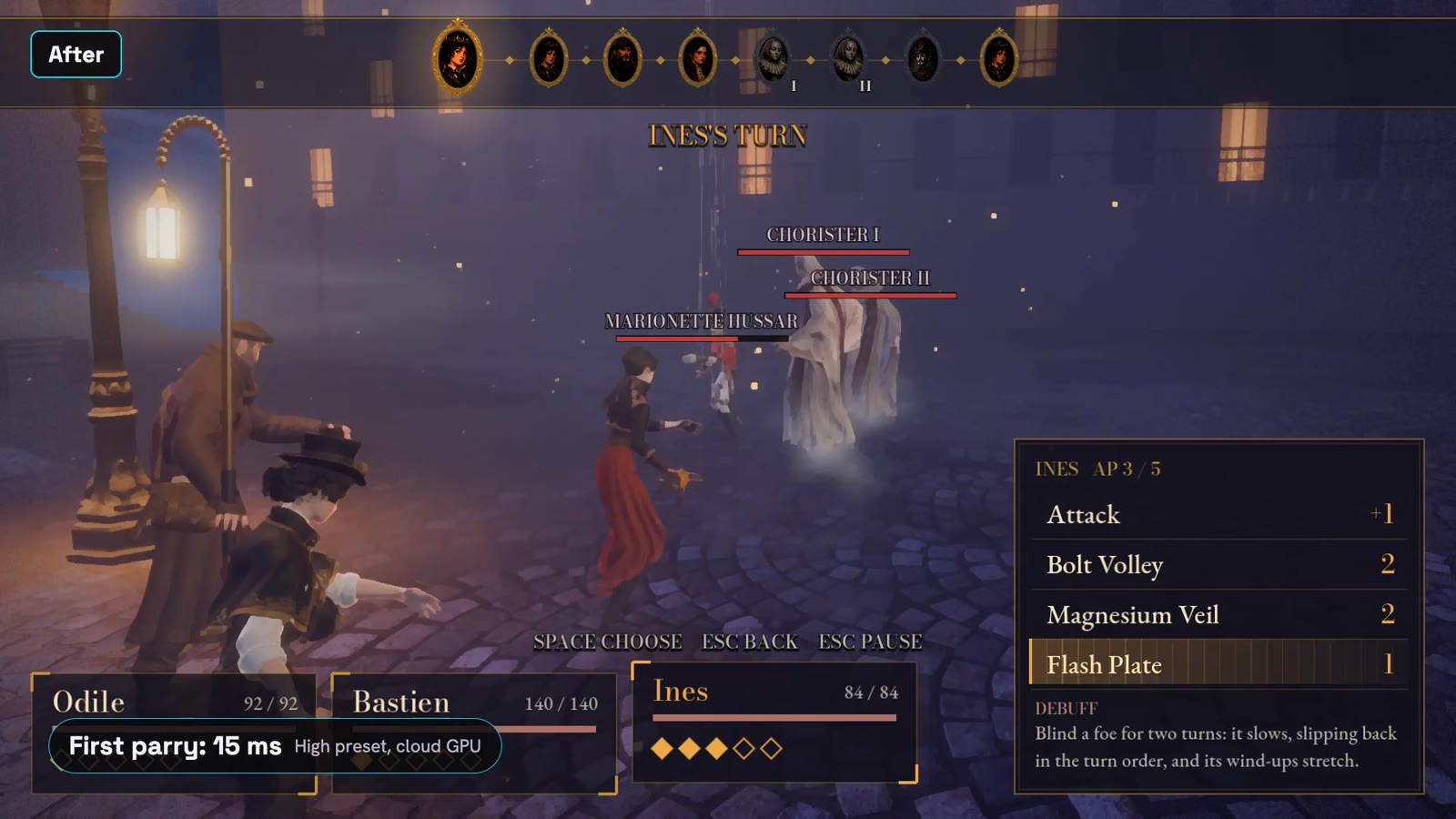
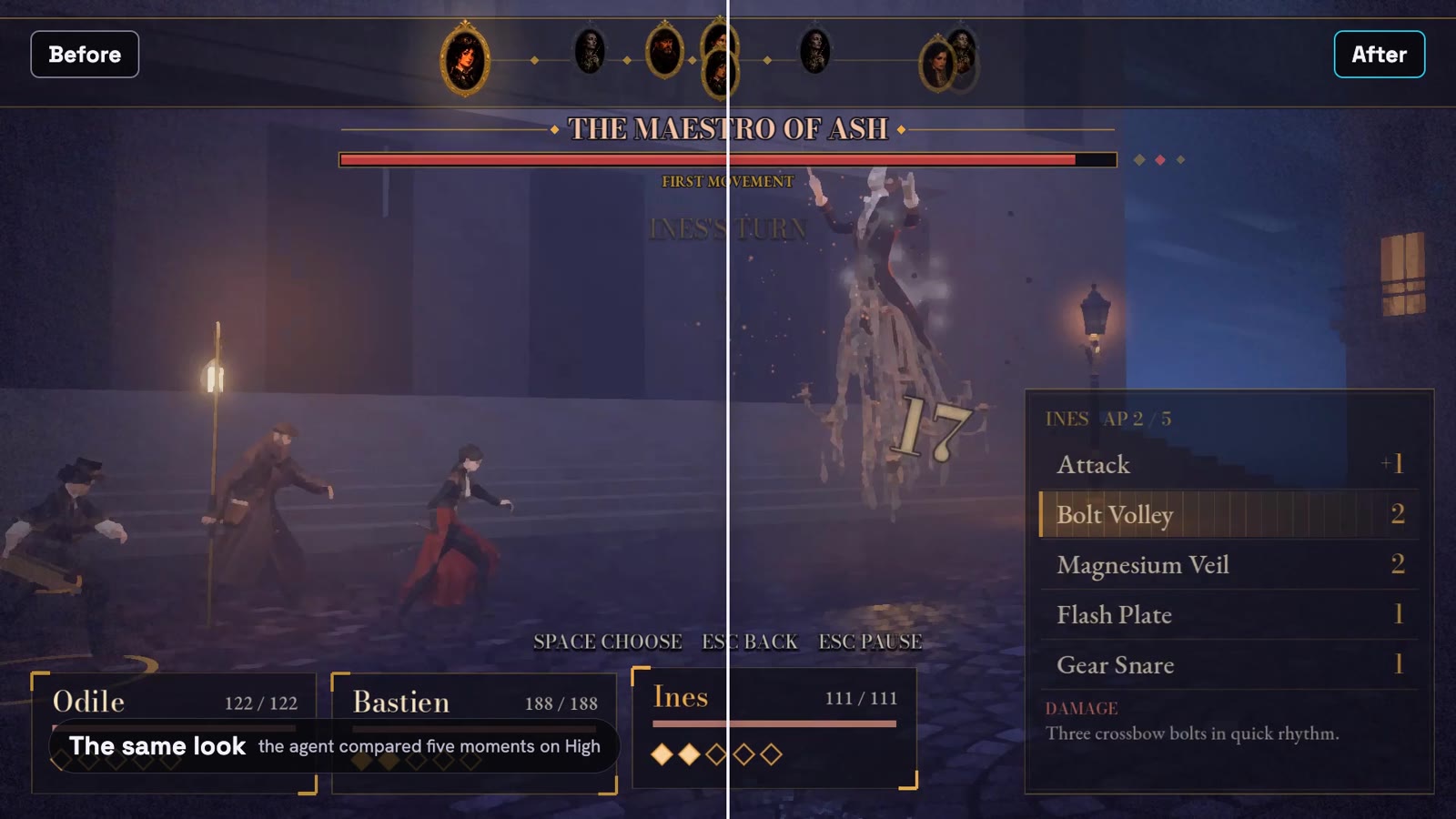
The loading curtain isn't free. The wait at the start of a fight is still there; it just happens in the dark with the clock stopped, instead of as a frozen fight with the clock running. The Low preset now draws about a sixth of the geometry it did, for laptops.
The agent was also clear about what it didn't fix. On High, its 95th-percentile frame of 9.48 ms is a little over the 8.3 ms it aims for on the default preset. The cost is the shadows (about 2.3 ms) and the global illumination (about 1.4 ms), which is what High is for. It said so and left them. That's the right call, and it's the kind of call you want made out loud rather than quietly.
Case two: what did it find in a shooter?
The second game is a squad shooter. In its first version the owner had reported stutter at the start, on the first shot and when enemies first appeared, and the agent had fixed it by feel with a warm-up. This time we could check, and the fix held. On High, the first shot, the first impact and the first smoke grenade each cost at most a quarter more than a normal frame.
The cost here was steady and nearly all on the graphics card: about 7.8 ms a frame on High against under 3 ms of CPU work. So the agent switched features off or down one at a time in the heaviest view, a hallway fight inside a house, to see what each part of the look costs on High:
| Switched off or turned down | Graphics card time saved |
|---|---|
| Sun shadows | 3.52 ms |
| Impact dust | 3.46 ms |
| Render scale, 100% down to 77% | 3.01 ms |
| Terrain | 1.95 ms |
| Bounce light | 1.72 ms |
| Anti-aliasing (MSAA, then TAA) | 1.10, 0.87 ms |
| Fog | 0.29 ms |
| Reflections | 0.25 ms |
Most of that list is the look itself. One line wasn't. Every puff of impact dust was a square sprite, and only the round puff in the middle is visible. On High, every pixel of the square still paid for shadows and bounce light, transparent corners included. The agent swapped the square for a 16-sided shape that just encloses the puff, about 30% fewer pixels for the dust.
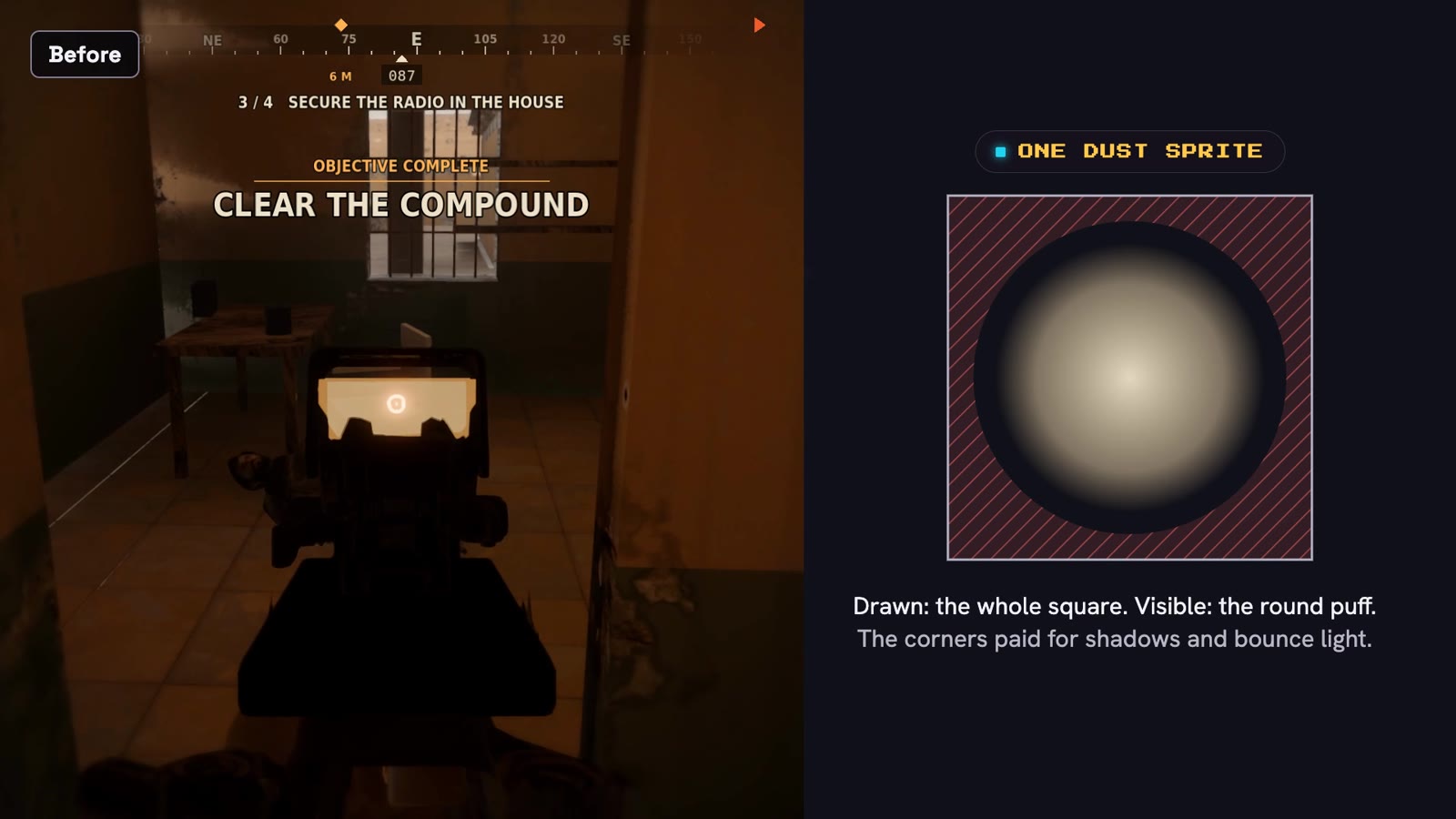
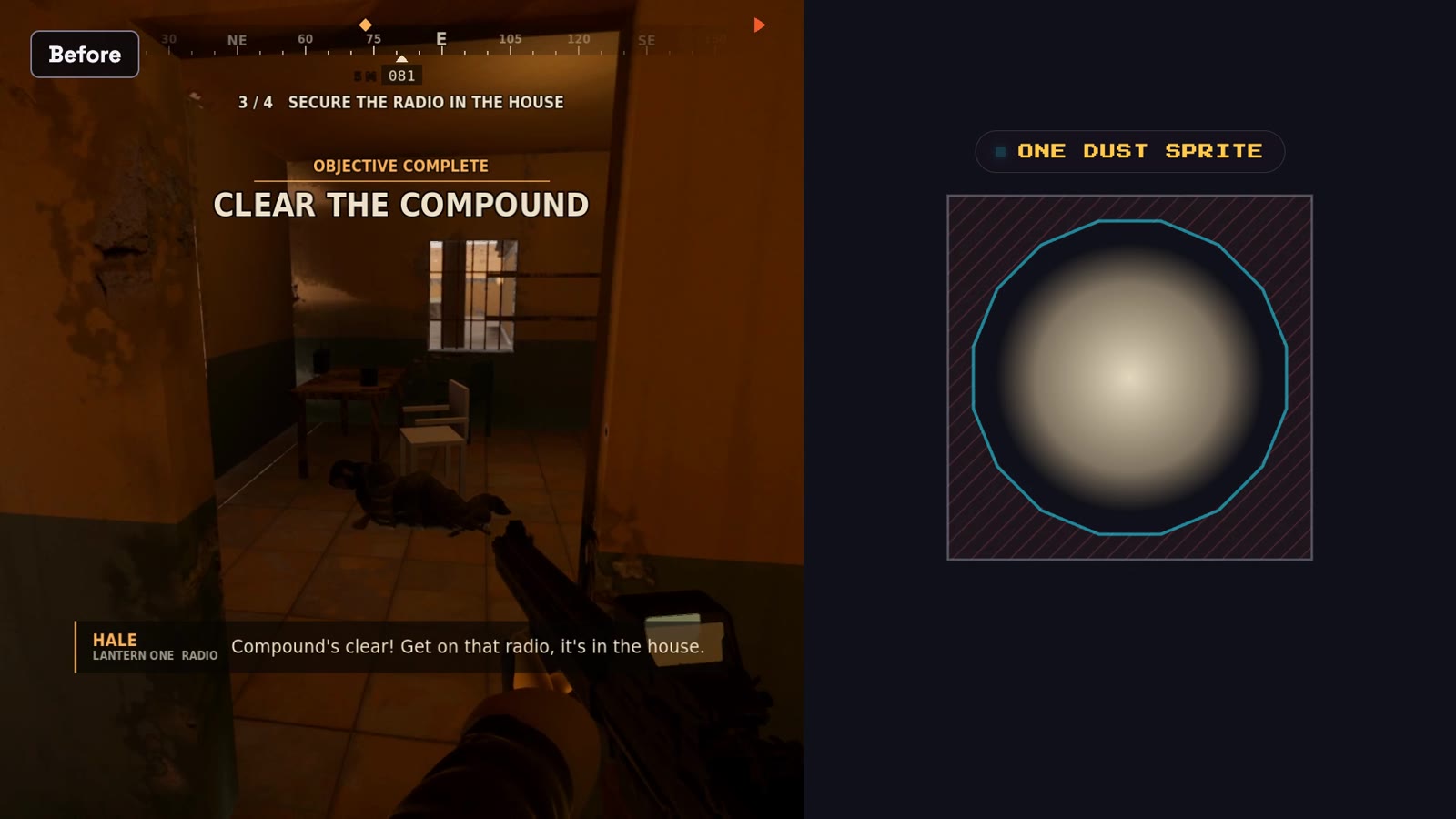
With the game paused on the same frame of that hallway fight, the graphics card went from 12.40 ms to 11.09 ms, about 10% cheaper, for an identical picture.
Then the Low preset: a smaller sun shadow map, no sun shadows from the 2,600 thorn bushes on the map, the terrain without its second texture pass, and sharper upscaling at the same render scale. Graphics card time per frame, before and after:
| Preset | The assault | Ragdoll deaths |
|---|---|---|
| Low | 2.35 → 1.59 ms (−32%) | 2.61 → 1.76 ms (−33%) |
| Medium | 4.35 → 4.05 ms | 4.58 → 4.22 ms |
| High | 7.82 → 7.78 ms | 7.99 → 8.06 ms |
| Ultra | 9.50 → 9.47 ms | 9.99 → 9.90 ms |
High and Ultra didn't change, on purpose. The agent measured them, tried two exact-output tricks that saved nothing, and reported that the cost was the look. A third less on Low is the number that matters for someone on a laptop.
What does this change for every game?
Most of what we found, in these two games and the ones before them, was the same mistake: something loaded or compiled the first time it appeared on screen. So every game turn now carries that as a standing instruction. Models, sprites, sounds and effects load before play starts, 3D games warm their shaders behind the loading screen, and nothing gets created in the per-frame loop.
The agent also runs a check on its own after a turn that adds heavy content or effects, and whenever you mention stutter or frame rate. You don't have to know the words. "The first fight hitches" is enough.
Performance checks aren't only for Pro games. A standard 3D game is measured on its web renderer, which doesn't report graphics card time, so the agent watches draw calls and frame times and leaves a wide margin. 2D games are measured in a phone-shaped window and aim to use about a quarter of the frame budget, because a phone is several times slower than a cloud GPU. What usually sinks a 2D game on a phone is drawing the same pixels many times: full-screen shaders, stacked transparent layers, lights.
What are the limits?
- A cloud GPU isn't your players' computer. Most of them have something slower. The agent aims for about half the frame budget at 1080p on the default preset, and quotes every number with the card and resolution it came from instead of promising a frame rate.
- The machines aren't all the same card. Before and after only mean something on the same one, so the agent compares like with like and reruns a side if it has to.
- A first launch can still load slowly. The graphics driver keeps its own shader cache that the game can't clear or fill in advance. In the RPG, the dark loading moment can take 1–8 seconds on a first launch.
- It can't feel your game. If something runs badly on your machine, tell the agent what you see and on what. It will measure what it can and say what it can't.
Why it matters
A game that looks finished and freezes for ten seconds at the start of every fight isn't finished. Until now, the agent had no way to know. Performance checks give it the same kind of evidence a person with a profiler would want: real frame times, where they went, and the same measurement after the fix. That means you don't have to take "it runs well" on trust. You get the before and after numbers, and the reasons behind them.
Frequently asked questions
Can vbgnt measure my game's frame rate?
Yes, on a cloud GPU. A performance check runs the game in real time with no frame cap and reports the average frame rate, the 1% low, frame-time percentiles and the worst frames, with each frame split into scripts, physics, render CPU and graphics card time. The agent measures the stretches you name, or the heaviest scenes, on each graphics preset.
What is the 1% low?
The frame rate across the slowest one frame in a hundred. It's what stutter feels like. A game can average over 100 frames a second and still freeze: in our RPG test the average on High was 108 fps while the 1% low was 6.7 fps, because a few frames took over a second each.
Why did the agent's earlier checks miss stutter?
They run the game on a fixed clock: every frame advances the game one thirtieth of a second, however long it took to draw. That makes screenshots and video repeatable, but a ten-second frame and a ten-millisecond frame look the same in the output. Performance checks drop the fixed clock and time real frames.
How do I ask for a performance turn?
Ask for numbers, name the parts of the game you care about and say what must not change. For example: measure the boss fight on every graphics preset, include the first time each effect appears, fix the biggest cost first, don't change how High looks, then measure again on the same card and give me before and after.
What does the agent usually fix?
Most often, something that loads or compiles the first time it appears on screen: shaders, particles, effects. The fix is a warm-up behind the loading screen. After that it goes after the largest steady cost, usually on the graphics card in 3D games, and lightens the lower presets so High keeps its look.
Does a cloud GPU tell me how my game runs on a player's computer?
Not exactly. Most players have something slower, so the agent aims for about half the frame budget at 1080p on the default preset and names the card and resolution behind every number. If the game runs badly on your machine, tell the agent what you see.
Do performance checks work for 2D and web games?
Yes. Standard 3D games are measured on their web renderer, and 2D games in a phone-shaped window with a wide margin, because a phone is several times slower than a cloud GPU. Ask for a phone performance pass and the agent measures, fixes and measures again.