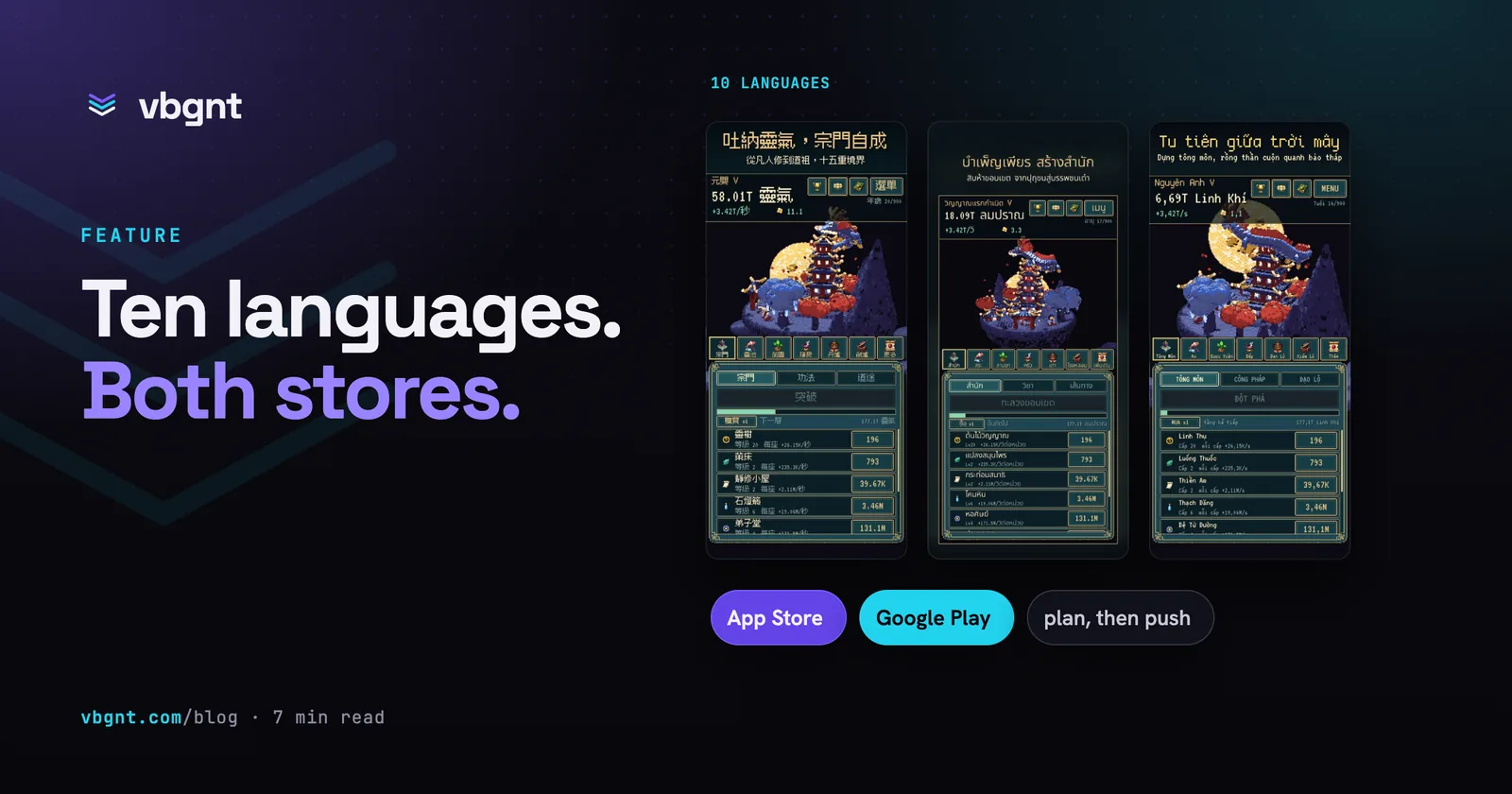
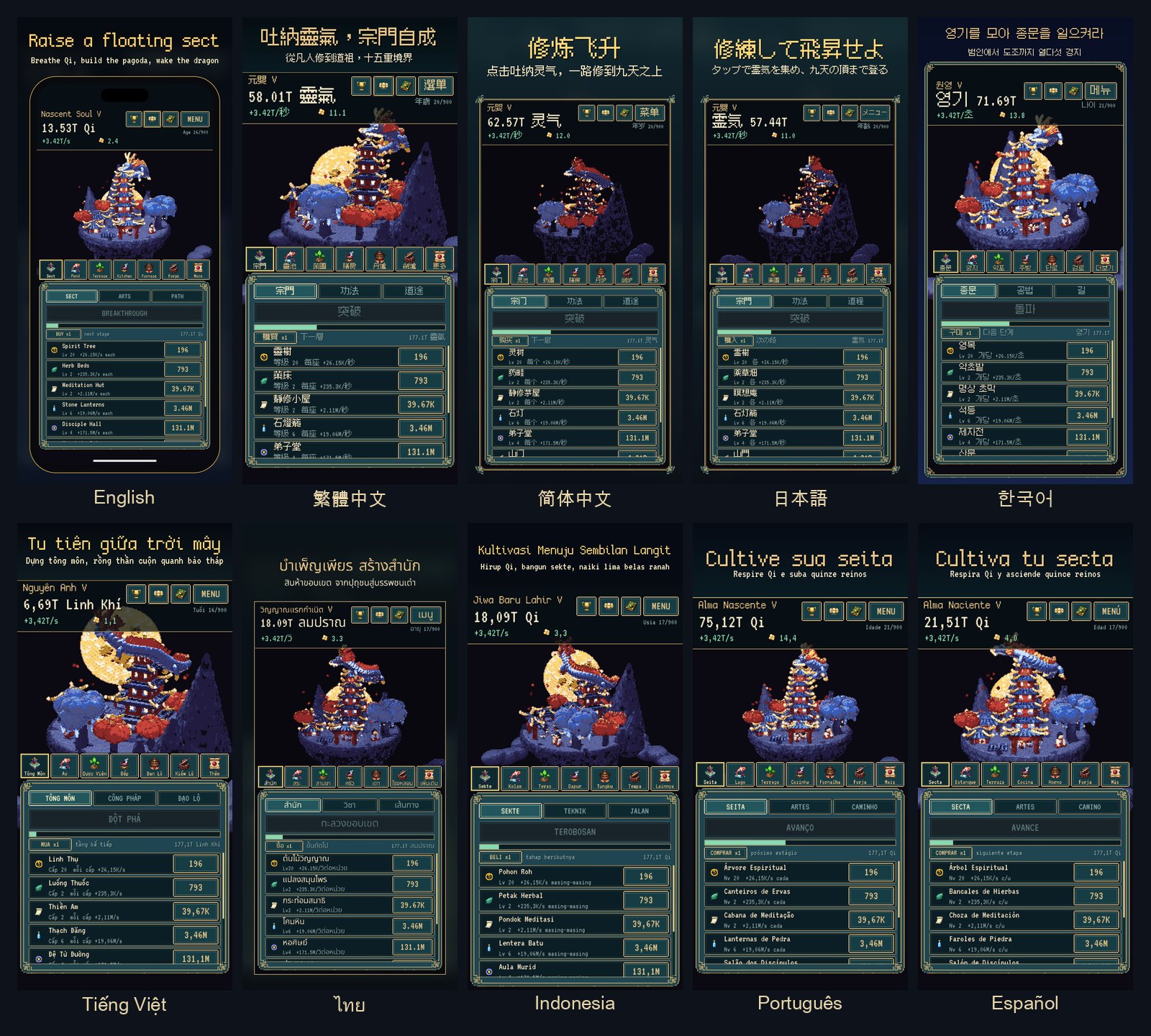
Nine Heavens Ascent II: Dragon Vein shipped in English. A day later it plays in ten languages, and its store pages on the App Store and Google Play are in all ten too, each with screenshots taken in that language. Nobody rewrote the game by hand, and nobody uploaded screenshots one by one.
Two new things made that possible. Localization lets the agent translate a whole game, and the engine draws every script properly, Chinese, Japanese, Korean and Thai included. Release kits take a marketing kit and an export and publish them to both stores, in every language, after you've seen exactly what will change.
What does localization do?
Localization moves every piece of text a player sees into one file per language, and the game draws whichever language the player's phone or browser uses. Ask for it in plain words, for example "Localize the game into Traditional Chinese, Vietnamese, Korean, Japanese and Brazilian Portuguese", and the agent:
- Pulls out every string: titles, menus, buttons, item names, tooltips, story text and the game over screen. Whole sentences go in with placeholders such as "{0} lanterns lit", never pieced together from fragments, because word order changes between languages.
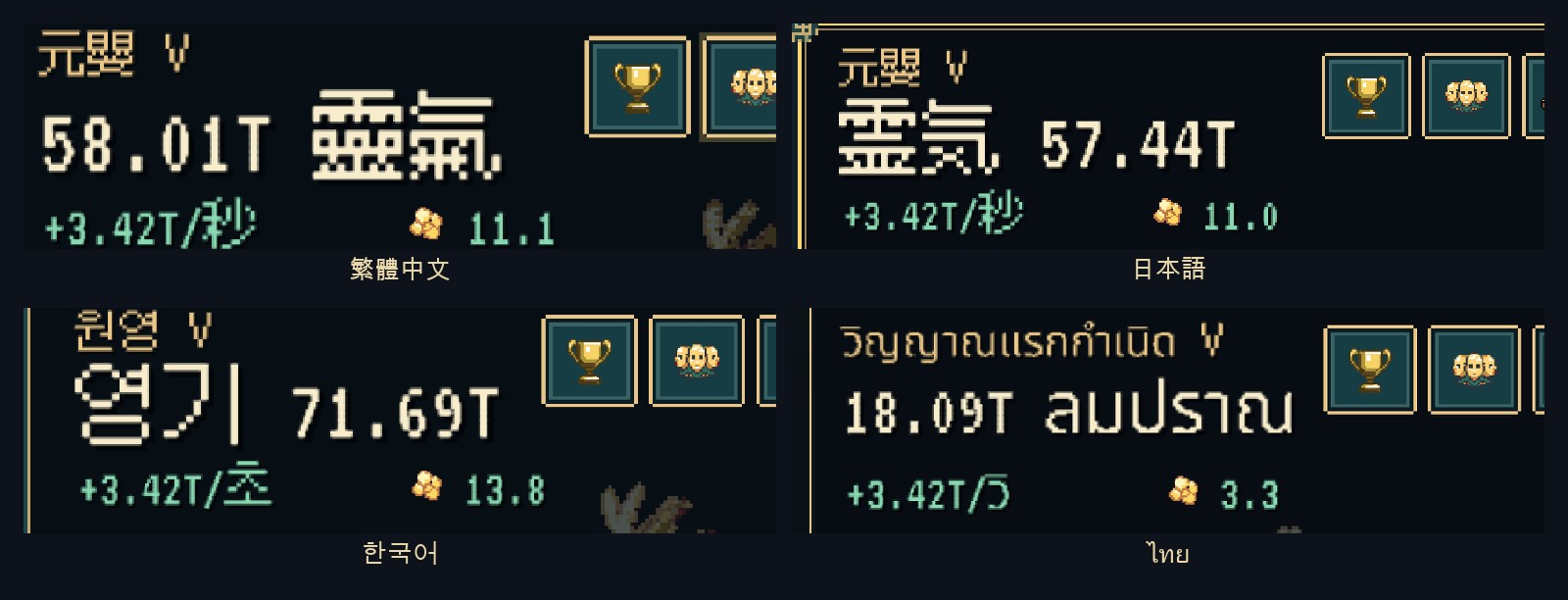
- Writes a glossary first. Realm names, resources and recurring terms get one translation per language, written into the game's design notes, and every later line uses them. Dragon Vein's cultivation realms read 練氣, 築基, 金丹, 元嬰 in Chinese, Luyện Khí, Trúc Cơ, Kim Đan in Vietnamese, and 연기, 축기, 금단 in Korean: the words readers of those genres already know.
- Translates for players, not word for word. Tone, plural forms and number formats follow each language: "1,00T" in Spanish, "1.00T" in English.
- Adds a Language row to the game's menu and checks every place in the game with a test language that flags any text it missed.
Dragon Vein has about 2,600 texts. The agent translated them into eight languages in one turn, added Thai in another, and checked each language with screenshots on a phone and a desktop.
Which languages can a game use?
Any of about fifty language codes: the European languages, Vietnamese, Indonesian, Malay and Filipino, Chinese (Simplified and Traditional), Japanese, Korean and Thai. The engine's own menus, settings, save screens and score tables already come in eighteen of them, so a game only translates its own text.
Right-to-left and joined scripts are the exception for now: Arabic, Hebrew, Persian and Hindi load, but don't yet draw the way they read.
What about fonts?
A game's font usually covers English and little else. When the game is built, the engine collects every character the translations use, finds the ones the game's own fonts lack, and adds just those from open-licence fonts. A Chinese translation of Dragon Vein needs about 1,500 characters, which comes to around 300 KB instead of a 17 MB font.
Pixel-art games get pixel fonts. Mark a language as "style": "pixel" and its missing characters come from pixel fonts instead: Fusion Pixel for Chinese, Japanese and Korean (each drawn its own regional way) and a pixel Thai font made for vbgnt on the same grid as common pixel UI fonts.
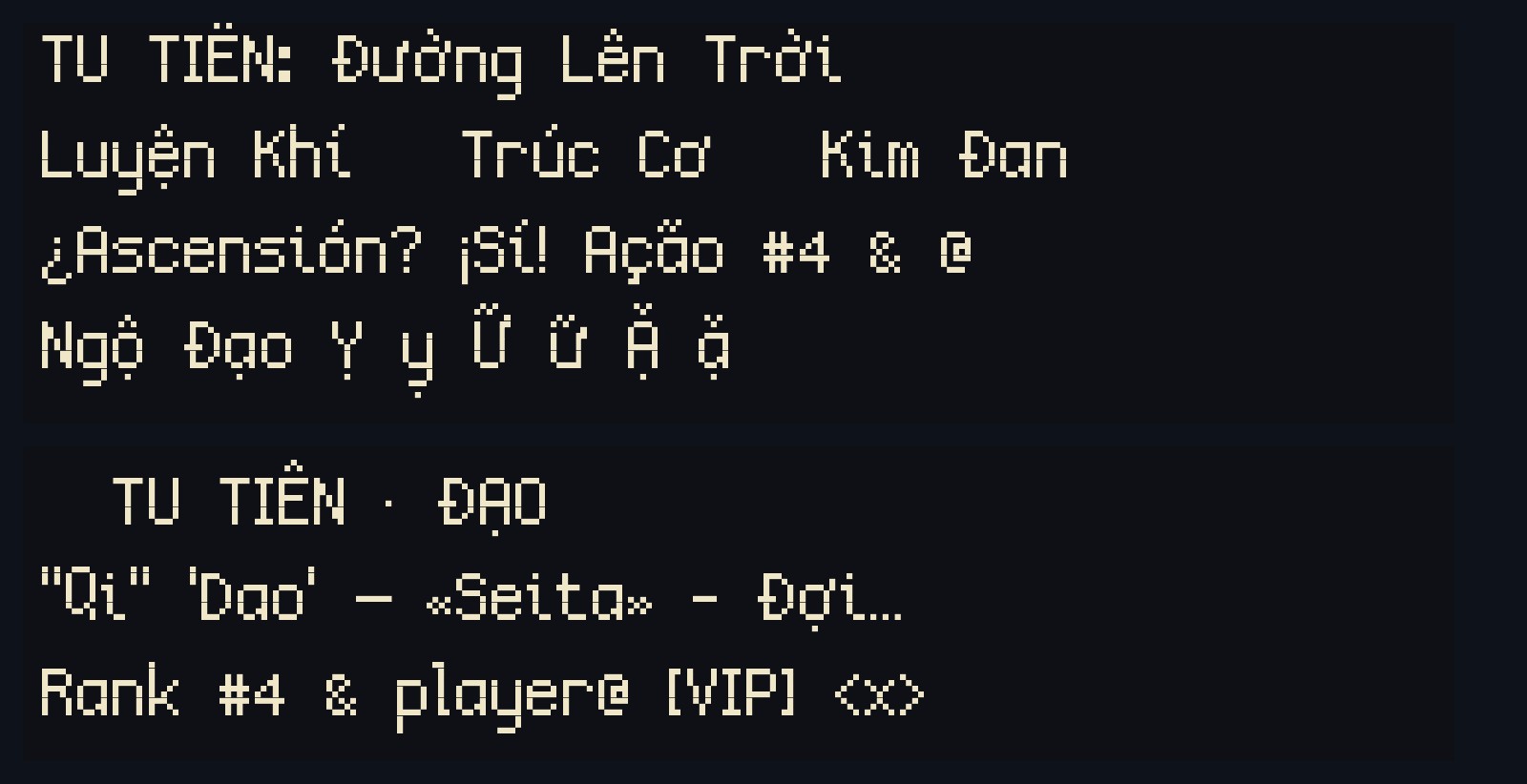
Fonts made with PixelLab, like Dragon Vein's heading font, have only A to Z, a to z and digits. One command, gander lang pixel-font, adds about 180 more characters in the font's own pixels: the accented letters of Vietnamese, Portuguese, Spanish, French and German, stacked Vietnamese tone marks, symbols like # & @ and the quotes and dashes translations use.
Why was Thai harder?
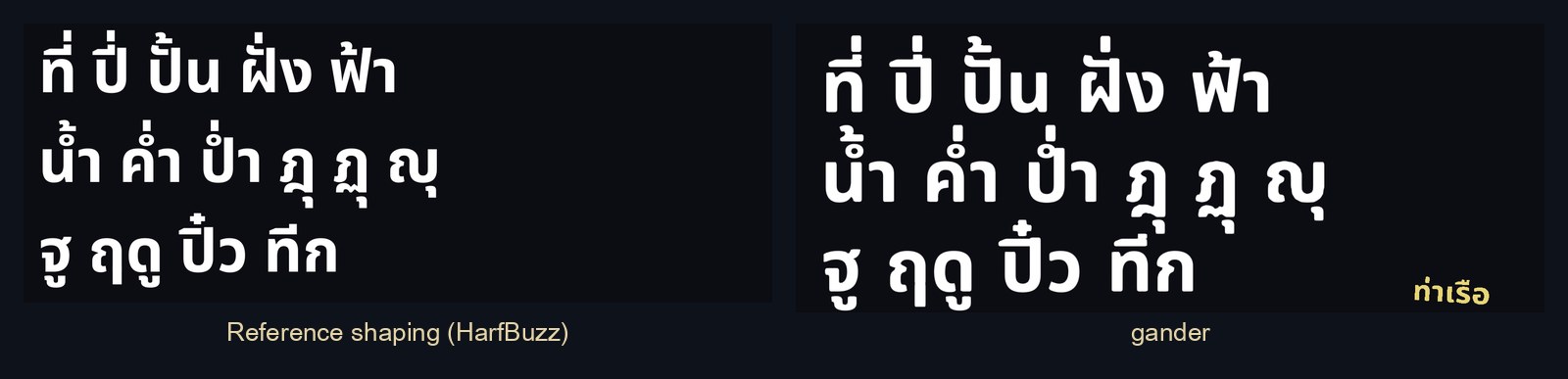
Thai stacks vowel and tone marks above and below a consonant, and it writes words with no spaces between them. Most game engines draw the marks in the wrong place or not at all. vbgnt's engine places them itself:
- a tone mark rises above an upper vowel (ที่), and moves left of tall letters (ปี่, ฟ้า);
- lower vowels drop below letters with a tail (ฎุ), and ญ and ฐ lose their tail over one (ญุ, ฐู);
- a tone mark before ำ sits above its ring (น้ำ).
Translators put an invisible break between Thai words, so lines wrap between words, never in the middle of one, and the language checker flags any long run that has none.
How do the store pages get translated?
A marketing kit can be made for one language. The kit agent plays the game in that language and captures every screenshot that way: ten for each App Store size (three iPhones, iPad and iPhone Duo), eight phone and eight tablet shots for Google Play, captions in the game's own fonts and a Play feature graphic with the translated title. It writes the store text within each store's limits, in the genre's own words, and a machine-readable copy that release kits can publish.
Dragon Vein has one kit per language. Store names have to fit 30 characters, so the kits shorten the longer titles: "Ascensão dos Nove Céus II: Veia do Dragão" became "Nove Céus II: Veia do Dragão" on the store, while the full title stays in the description and on the feature graphic.
What is a release kit?
A release kit publishes a marketing kit and an export to the App Store and Google Play. It's in the game's Publish pane, and over MCP for your own agent:
- Connect the stores once. Save an App Store Connect team API key (the Admin role, so the builder can sign iOS builds for you) and a Google Play service account. The studio lists the apps each key can see, and you link the game to its App Store app and Play package. The keys belong to your account and are only used for your releases.
- Plan. Pick a marketing kit, an export, the stores, the Play track (internal, closed or production) and the languages. The first run only reads: you get a table of every field and image set, per store and per language, with what's live now and what will replace it.
- Push. On your go, the release writes the listings, uploads the screenshots and graphics, fills in the questionnaires the stores' APIs allow, puts the Android bundle on the track you chose, and builds, signs and uploads the iOS app on a Mac builder.
- Send for review on a second confirmation. An App Store submission can be pulled back; on Play, a newer release replaces the one in review.
Nothing that's already live is changed unless the plan shows it. A promo video on Play, or art you placed by hand on the App Store, stays as it is.
How long did Dragon Vein take?
About a day, most of it waiting. Two turns translated the game, a third switched its fonts to pixel ones, and one more fixed a phone tapping bug found along the way. Ten marketing kits ran one after another, at 15 to 30 minutes each. Then two pushes per store published nine new languages: 450 App Store screenshots and 216 for Google Play, plus every title, description and keyword list. Version 1.0.5 went to Google Play in all ten languages the same day.
What doesn't it do yet?
- Right-to-left scripts. Arabic, Hebrew, Persian and Hindi aren't drawn correctly yet.
- Translated preview videos. Trailers and App Store previews are still made per game, not per language.
- Console-only forms. Google Play's content rating questionnaire and a few other forms have no API, so they stay in Play Console.
- New store apps. Neither store lets an API create an app. You create the app record once, and the release kit takes it from there.
Frequently asked questions
Can vbgnt translate my game into other languages?
Yes. Ask the agent to localize the game into the languages you want. It moves every player-facing string into one file per language, writes a glossary of recurring terms first, translates from it, adds a Language row to the menu and checks every screen. The game uses the player's device language automatically.
Which languages are supported?
About fifty language codes, including the European languages, Vietnamese, Indonesian, Malay, Filipino, Simplified and Traditional Chinese, Japanese, Korean and Thai. Right-to-left and joined scripts such as Arabic, Hebrew, Persian and Hindi are not drawn correctly yet.
Does a pixel-art game keep its look in Chinese or Japanese?
It can. Marking a language as pixel style makes the engine take its missing characters from pixel fonts (Fusion Pixel for Chinese, Japanese and Korean, and a pixel Thai font) instead of smooth ones, so they match the game's own lettering. A PixelLab font can be extended with accented letters and symbols using gander lang pixel-font.
Can I publish translated store pages automatically?
Yes, with a release kit. Make a mobile marketing kit per language, connect your App Store Connect and Google Play keys once, and start a release from the Publish pane. You see a plan of every change per store and language first, then push the listings, screenshots and builds.
What App Store Connect key does a release kit need?
A team API key with the Admin role, so the Mac builder can sign the iOS build with your team's cloud-managed distribution certificate and upload it. Google Play needs a service account invited to your developer account with permission to manage the store listing and releases.
Does a release kit submit my app for review on its own?
No. Pushing and submitting are two separate confirmations. A plan never writes anything, a push updates the listings and uploads the builds, and only a second confirmation sends the version for review. An App Store submission can be pulled back afterwards.